Showing posts with label Internet. Show all posts

Monday, 5 May 2014

Opera 21.0.1432.57


Opera is a Web browser that offers lots of features to let you take advantage of today's Web. Opera's interface combines precision and quality. Integrating modern style with powerful features, Opera gives you the freedom to truly open the web and explore. Surf the Web at lightning speed. Protect yourself against Internet threats.

Download: Opera 21.0.1432.57 | 26.7 MB (Freeware)
View: Opera  Website | Release Notes (Not yet available)

[via]

Wednesday, 30 April 2014

Firefox 29 with revamped Australis interface rolling out


After nearly two years of sneak peeks and previews, Mozilla on Tuesday rolls out Firefox 29, the first official version of the open source browser with Mozilla's new Australis interface. "It’s not an interface adjustment or tweak. It’s not a bug fix. It’s a complete re-envisioning of Firefox’s user experience, and it’s been brewing for the past five years," Jennifer Morrow, senior user experience designer at Mozilla, wrote in a blog post on her personal site.

The new look borrows somewhat from Google Chrome, including rounded tabs and a menu icon in the upper right corner. (The image up top shows the old Firefox interface on the left side of the split, and the new Australis UI on the right.)

Nevertheless, the new browser still maintains a Mozilla-esque look with the oversized back button, a separate search box, and default menu options in the toolbar.

We've covered Mozilla's new design decisions previously, but here are the highlights:
  • The Orange Firefox button is gone in Windows and replaced with a "hamburger" icon in the upper right corner
  • Tabs are now rounded and only the current active tab is outlined
  • The menu in the upper right corner is simpler and uses a drag-and-drop interface for easy customization
That last feature is perhaps the biggest change with Firefox 29. Now that the Windows 7-era orange menu button is gone, Firefox's menu uses large—dare I say touchable?—icons above the text.

This results in a streamlined default menu with only the basics available, such as the ability to open a new or private window, save a webpage, print, history, full screen mode, find in page, options, add-ons, and developer tools.

Anyone who wants to change the default menu can easily add or take away options by clicking the Customize option at the bottom of the menu. This takes you to a special tab where you can add options to the menu or the toolbar such as open file, email link, tab groups, or an RSS subscribe button. Drag-and-drop editing for the toolbar is a longstanding feature of Firefox, but the ability to edit the menu is new with Australis.


This tab also provides options to show or hide toolbars such as the bookmarks bar or show and hide the title bar at the top of the window. Anyone who prefers to have text menu options at the top of the window can still get them by right-clicking the main toolbar and selecting Menu bar from the contextual menu.

Firefox 29 is expected to be available Tuesday for download from Mozilla's site. Current Firefox users can force the update right now by clicking Help > About Firefox from the browser's main menu.

Internet Download Manager 6.19 Build 8

Internet Download Manager (IDM) is a tool to increase download speeds by up to 5 times, resume and schedule downloads. Comprehensive error recovery and resume capability will restart broken or interrupted downloads due to lost connections, network problems, computer shutdowns, or unexpected power outages. IDM integrates seamlessly into Internet Explorer, Chrome, Opera, Firefox, Avant Browser, and all other popular browsers to automatically handle your downloads. You can also drag and drop files, or use Internet Download Manager from command line. The program supports proxy servers, ftp and http protocols, firewalls, redirects, cookies, authorization, MP3 audio and MPEG video content processing.

What's new in this version:
  • Added support for Firefox 31 and SeaMonkey 2.26
  • Fixed bugs
Download: Internet Download Manager 6.19 Build 8 | 5.6 MB (Shareware, $24.95)
View:
IDM Website | Source : Neowin.net

Monday, 28 April 2014

Google Chrome 34.0.1847.131


The web browser is arguably the most important piece of software on your computer. You spend much of your time online inside a browser: when you search, chat, email, shop, bank, read the news, and watch videos online, you often do all this using a browser.

Google Chrome is a browser that combines a minimal design with sophisticated technology to make the web faster, safer, and easier. Use one box for everything--type in the address bar and get suggestions for both search and Web pages. Thumbnails of your top sites let you access your favorite pages instantly with lightning speed from any new tab. Desktop shortcuts allow you to launch your favorite Web apps straight from your desktop. Google Chrome also uses a brand new JavaScript engine (V8), which is much faster than existing javascript interpreters. 

This means you can create more complex and more intensive AJAX applications with fewer speed and processing constraints. Finally, Google Chrome is built on top of WebKit, so Google Chrome users will benefit from the CSS3 features being added to WebKit as those features are released.

Chrome has many useful features built in, including automatic full-page translation and access to thousands of apps, extensions, and themes from the Chrome Web Store.

Google Chrome is one of the best solutions for Internet browsing giving you high level of security, speed and great features.

Download: Google Chrome 34.0.1847.131 | 800 KB (Freeware)
Download page: Google Chrome Offline Installer
Download: Google Chrome portable | 1.4 MB
View: Chrome Website | Release Notes

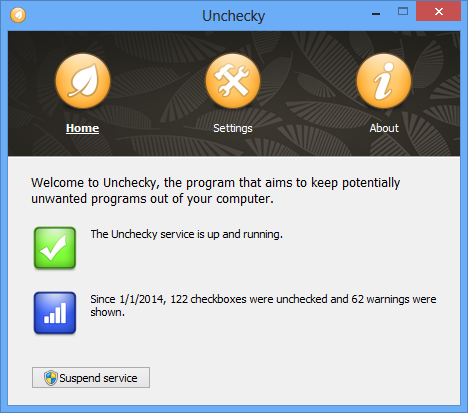
Unchecky 0.2.13


Tired of unchecking unrelated offers while installing software?

Have you ever felt, while installing software, that the installer tries to push additional unwanted programs at all cost? Ever missed a checkbox, and spent hours afterwards removing adware? Ever opened your browser after an installation, only to find out that you have a new homepage, a new search engine, or even a new browser? Unchecky aims to keep potentially unwanted programs out of your computer.

Unchecky’s primary feature is automatic unchecking of unrelated offers, such as potentially unwanted programs, offers to change your homepage or your search engine. With Unchecky, these offers become opt-in instead of opt-out, i.e. they will be installed only if you explicitly choose you want them (you usually don’t).
Another important feature of Unchecky is that it warns when you accept a potentially unwanted offer. Installers often provide them as a natural part of the installation, so they can easily be accepted by mistake. With Unchecky, it’s less likely to accidentally accept such offers.
Unchecky is not an universal solution, and might not support installers which were not released yet. Thus, it’s worth noting that Unchecky updates automatically, so you don’t have to worry about running the latest version.
What's new in this version:
  • Hotfix: fixed Croatian translation encoding.
v0.2.12 (April 26, 2014)
  • Support for SweetIM Bundle.
  • Improved support for Softonic installer.
  • Added help for command line arguments of the installer. Run "unchecky_setup.exe -?" to see it.
  • Various filter updates.
  • Croatian translation, by Marko.
Download: Unchecky 0.2.13 | 679 KB (Freeware)
View: Unchecky Website

Firefox 29.0 released for download


Mozilla Firefox is a fast, full-featured Web browser. Firefox includes pop-up blocking, tab-browsing, integrated Google search, simplified privacy controls, a streamlined browser window that shows you more of the page than any other browser and a number of additional features that work with you to help you get the most out of your time online.

The Web is all about innovation, and Firefox sets the pace with dozens of new features to deliver a faster, more secure and customizable Web browsing experience for all.

User Experience. The enhancements to Firefox provide the best possible browsing experience on the Web. The new Firefox smart location bar, affectionately known as the "Awesome Bar," learns as people use it, adapting to user preferences and offering better fitting matches over time.

Performance. Firefox is built on top of the powerful new Gecko platform, resulting in a safer, easier to use and more personal product.

Security. Firefox raises the bar for security. The new malware and phishing protection helps protect from viruses, worms, trojans and spyware to keep people safe on the Web.

Customization. Everyone uses the Web differently, and Firefox lets users customize their browser with more than 5,000 add-ons.

Download: Firefox 29.0 for Windows | 27.7 MB (Freeware)
Download: Classic Theme Restorer (Customize Australis)
Download: Firefox 29.0 for Linux | 34.6 MB
Download: Firefox 29.0 for MacOS | 56.1 MB
View: Firefox Website | Release Notes (Not yet available)

Saturday, 26 April 2014

Mozilla Firefox shortcut keys


Below is a listing of all the major shortcut keys in Mozilla Firefox.

Shortcut Keys             Description

Alt + Home                                     Open your home page.
Alt + Left Arrow                             Back a page.
Alt + Right Arrow                          Forward a page.
F5                                                     Refresh current page, frame, or tab.
F11                                                   Display the current website in full screen mode. Pressing
                                                          F11 again will exit this mode.
Esc                                                   Stop page or download from loading.
Ctrl + (- or +)                                   Increase or decrease the font size, pressing '-' will decrease                                                             and '+'  will increase. Ctrl + 0  ill reset back to default.
Ctrl + Enter                                     Quickly complete an address.
Ctrl + Shift + Del                            Open the Clear Data window to quickly clear private data.
Ctrl + D                                             Add a bookmark for the page currently opened.
Ctrl + I                                               Display available bookmarks.
Ctrl + J                                              Display the download window.
Ctrl + K or Ctrl + E                         Move the cursor to the search box.
Ctrl + N                                             Open New browser window.
Ctrl + P                                             Print current page or frame.
Ctrl + T                                             Opens a new tab.
Ctrl + F4 or Ctrl + W                      Closes the currently selected tab.
Ctrl + Shift + T                                Undo the close of a window.
Ctrl + Tab                                         Moves through each of the open tabs.
Spacebar                                         Moves down a page at a time.
Shift + Spacebar                            Moves up a page at a time.
Alt + Down arrow                           Display all previous text entered in a text box and available                                                           
options on drop down menu.

What To Look For In A Web Host?

The Internet has become a mainstream means of communication and source of information. These days any serious business from a sole trader to a multinational corporation needs to have a website. Of course creating a site means finding somewhere to host it and this is an important decision. If your Web host is unreliable it reflects badly on your business so it’s vital to spend some time selecting the right provider. There’s plenty of choice when it comes to website hosting, Cape Town and other cities are likely to have many providers so here are some of the things you need to look out for.


 Reliability and Speed:

Reliability is perhaps the most important factor; if your website is unavailable you’ve lost a vital part of your company’s operation. If you sell products directly online then this is even more important as all the time it’s down you’ll be losing orders. Internet users tend to have limited patience and if your site is down they’ll seek out a competitor rather than wait for it to come back.

Speed is almost as important. If your site takes too long to load or slows down during times of peak demand then again you’ll lose business as potential customers surf away elsewhere.

Bandwidth:

Bandwidth refers to the amount of traffic – the number of bytes of data – transferred from your site when people access it. Hosting companies often charge for bandwidth so you need to ensure that you understand what you’re paying for. If there’s a monthly limit – usually in gigabytes – make sure that this is going to be enough for your needs. If you’re expecting to see a sudden spike in traffic, as a result of an advertising campaign say, then make sure this won’t push you over your allowance and land you with extra charges.

Even if a host says it offers unlimited bandwidth there will usually be some sort of fair use limitation. Take some time to read the small print of what’s on offer to ensure that you don’t run into any hidden charges. It can sometimes be difficult to foresee bandwidth requirements so a transparent pricing policy will help you to manage your expenditure.

Storage Space:

Most hosts offer packages that have differing amounts of disk space. You may find that you need less than you think, ordinary websites are quite small in size. The only time you’re likely to run into limits is if you’re hosting large numbers of music and video files. Again beware of fair use limits on ‘unlimited storage’ deals that may well trip you up if you exceed them.

Technical Support:

Your website is a key part of your business so you need to be sure you can get support to help you deal with problems. Things often go wrong at the least convenient times so you need to make sure your chosen host offers 24/7 support. Check to see if their support staff members are available on public holidays too.

Scripting and Shopping:

Scripts are often used on websites to implement specific features, visitors’ books for example. Some hosting providers won’t allow you to install scripts without their permission so check to see if this is the case. It will slow down the implementation of a new site if you have to wait for the host’s approval before you can roll out changes.

If you’re planning on selling directly from your website then you need to ensure that the host supports SSL (Secure Sockets Layer) to allow you to collect payments safely. Also find out if you’re restricted to using their shopping cart facility or if you can implement your own.

These are the key considerations but there are others too and it’s always worth checking reviews left by other users or asking the company if you can talk to some existing customers before you sign up.

What To Consider When Choosing Cloud Backups

Every computer expert will tell you to backup early and often. However, sometimes there is insufficient space to backup and store all the data. Accidents happen and one loses data in a hard drive crash, which can be catastrophic when one is in the middle of a vital assignment. Sometimes your computer is stolen or the office burns down. We never really know what life has got in store for us, which is why data storage is crucial.

Cloud Backups:

Cloud backup is the name for data and information being stored in a secure data centre via internet. These data centres could be in any remote location in the world. Cloud storage takes away some of the stress about storage away from the individual who no longer needs to overprotect the device in which the data is stored. With cloud backups, the data is protected from accidental or intentional damage. Several issues come into play when considering the use of cloud backups. It is important to know how the service works, its limitation and its effects on the running of your enterprise.

Protect Against Leaks:

Among the major concerns for most organisations is data security. Data protection is absolutely paramount for individuals and, in the case of businesses, data leaks can have very serious repercussions indeed. For example, leaked customer contacts from a database could spammed with unnecessary mails or credit information used for other forms of cyber crimes. Files should be heavily encrypted before leaving the onsite storage. Encryption should be at least 256 bit or higher. Always ensure the service provider states their security policy before you begin to consider engaging their services in storing your data.

Know Your Limits:

Most of the service providers limit the sizes of data they can store by price; so your storage allowance depends on how much you pay. When deciding your cloud backup plan, take into consideration the size of your data and the quantity that is generated at a particular period of time. Check whether your provider can increase the available space if needed and at what cost. Some providers will limit the size of individual files, so be wary of such restrictions especially if you store large files such as videos.

A few service providers will limit the amount of data that can be uploaded or downloaded at any given time. Most of them will not. However, it is vital to know their policy so as to avoid the risk of being unable to access your information as quickly as possible in cases of damage to onsite storage. Initial uploads sometimes take quite some time. This is partly due to bandwidth limitation and partly due to the size of uploading files.

Access All Areas?

Consider whether the service provider allows you to access your files from other computers other than your basic computer. Web enabled access is convenient as one can access their files from any internet enabled device by logging into the providers website. You could download that bill, spreadsheet or statement way from office or home. If you would like to have automatic file upgrades, check whether the provider has software that monitors file changes. Otherwise, you would be forced to manually back up your files.

Final Considerations:

Where none catastrophic data losses are involved, it is often easier to restore data from a local storage in comparison to a cloud backup, so it is worth remembering this when assessing your cloud backup requirement. Another thing to bear in mind, especially if you pay per gigabyte or monthly, is reduplication services. Reduplication minimises the amount of data being stored because where similar files exist, it indicates the specific location of the data, rather than performing a double backup of your data. Overall it is clear that, wherever possible, it is prudent to have an online backup solution in place. It might cost more but in the long term it could save your business.

What is Cloud Computing?

You may have heard the term “Cloud computing” and wondered what it meant. Savvy IT professionals are aware that cloud computing refers to a system of servers that gives people access to computer services over a network, such as the Internet.

Cloud computing is taking off because organizations are realizing the many benefits it provides, including saving money on hardware and software, lowering the burden on IT department personnel and enabling companies to back up their vital data safely and securely.


In fact, cloud computing services are expected to generate almost 14 million jobs across the world by 2015, with many of these jobs coming from small-to-medium sized businesses, according to the IDC report “Cloud Computing’s Role in Job Creation.” What’s more, cloud computing could produce up to $1.1 trillion in revenue every year by 2015.

Remote Backups and Disaster Recovery:

If your company does not routinely make offsite backups of its vital data, what will you do in the face of a catastrophic hard drive crash? While prudent managers will at least set up extra servers to back up data locally, it’s important to maintain offsite backups as well, in case of a natural disaster, extended power failure, theft or other problems.

Cloud computing makes it easy to make multiple backup copies of your data, which you can then access via the Internet to recover information during a disaster.

While your competitors are struggling to regain power and reconstruct their databases, you can quickly restore your important files by accessing them via the cloud. Even if you have to evacuate the premises, such as during a severe weather event, your employees can use laptops or smart phones to access data via the cloud from a hotel, coffee shop or their office at home, thanks to cloud computing.

Save Money on Software and IT Services:

Organizations find that they can save money on software and IT services by taking advantage of cloud computing services. For example, instead of purchasing expensive licenses for a suite of office applications or a particular database program for your entire workforce, you can use software as a service (SaaS) on an as-needed basis. The software is always available via the cloud, and your employees access it through a standard web browser.

Your IT department won’t have to worry about updating software or applying security patches, as the cloud computing service provider’s IT department will take care of this task for you.

You can also purchase access to encrypted server storage space from a cloud services provider whenever you need it. Virtual Private Server (VPS) hosting helps companies save money, as they don’t need to try to plan ahead and purchase additional server space for local use.

Access Data While on the Go:

Does your organization rely on travelling sales people and marketing specialists to drum up new business? If so, these employees are going to be on the road quite frequently. Instead of trying to bring copies of all necessary files with them on their laptops, they can access your company’s data securely via cloud computing.

When a salesperson develops a lead, he can input the data on his device while out in the field, and the information will be instantly accessible to everyone in your organization’s headquarters via the cloud.

Imagine updating important documents that everyone in your company needs to access quickly and reliably. For example, have you changed the terms of your standard contracts? Your legal department can put the updated files in the cloud so that employee will always be able to access the latest versions.

After examining the benefits of cloud computing, many people will want to consider implementing it for their own organizations. Whether you use cloud computing just to keep safe backups in an offsite location or rely on it for fast and reliable access to inexpensive software as a service, this technology is designed to make your organization work more efficiently and save your money. Cloud computing can give you a boost over your competitors, and that’s reason enough to begin implementing it to some degree at your firm.

Do You Really Know How Far Your Goods Will Travel When You Order Online?

The internet has had a dramatic effect on the way most of us choose and buy a wide variety of products. Just a few years ago, our preferred method of shopping is likely to have been to pay a visit to our local shops, or, if we were looking to make a special purchase, probably to venture into a nearby city, or to an out-of-town shopping centre, where the biggest outlets with the widest choice of products could be found.

That idea has been strongly challenged in recent times, as most of us become ever-more accustomed to looking for what we want to buy online. For major purchases especially, we are happy to scour the internet to find the cheapest prices available.

 But how many people, when they do this, give much thought to where the websites on which they find the best prices are run from, and therefore, how far their goods will have to travel to reach them when they finally click on that 'Buy Now' button.

My guess would be very few. We have become so intent on tracking down the best possible price for the precise product we want, that little thought is given to how it will eventually reach us after we take that split-second decision to make a purchase from a particular website.

Buying Online creates convenience:

From the buyer's point of view, shopping online breaks new boundaries in convenience, because it means we can compare products for all the criteria which we can possibly consider when we buy, and then look for the outlet which offers the product we find best meets our needs at the lowest possible price. And yet, when we do this, apart from exceptional occasions when a website will publish its full registered address, most of us will give little or no thought to where our goods will be shipped from, and therefore the task which lies ahead for the delivery company which will ensure that those goods, ordered in a fraction of a second, in turn reach us safely and in the shortest time possible.

This convenience is, of course, a compelling reason why so many of us now choose to shop for many of the things we buy online. But conversely, businesses of course are always looking out for locations from where they can operate while incurring the lowest possible overheads.

As a result, a company can have as many 'shop fronts' as possible, yet its online operation could equally be run from relatively unassuming premises, well away from the locations of these prestigious shop windows. Companies which already have large-scale premises which are used for storage of their products before they are sent out to their stores may, therefore, have a strong advantage over purely web-based companies when it comes to operating the online arm of their business.

But in truth, the motivation for shopping online is so strongly skewed towards seeking out the lowest possible price for the products that we want to buy, that the vast majority of shoppers won't care whether their goods are picked off the shelves of a posh flagship store, or come from a dingy warehouse operated from an industrial estate – provided they reach them safely, and in a reasonable time-frame.

Google's mulling Wi-Fi for cities with Google Fiber

Google is considering deploying Wi-Fi networks in towns and cities covered by its Google Fiber high-speed Internet service.
The disclosure is made in a document Google is circulating to 34 cities that are the next candidates to receive Google Fiber in 2015.
Specific details of the Wi-Fi plan are not included in the document, which was seen by IDG News Service, but Google says it will be “discussing our Wi-Fi plans and related requirements with your city as we move forward with your city during this planning process.”
If the plan goes ahead, it would be a further step by Google toward competition with traditional telecom carriers. For citizens of the cities involved, it could mean increased reliance on services by the dominant Internet company.
Google declined to answer specific questions about the plans but in an emailed statement said, “We’d love to be able to bring Wi-Fi access to all of our Fiber cities, but we don’t have any specific plans to announce right now.”
Google Fiber is already available in Provo, Utah, and Kansas City, and is promised soon in Austin, Texas. It delivers a “basic speed” service for no charge, a gigabit-per-second service for $70 per month and a $120 package that includes a bundle of more than 200 TV channels. Installation costs between nothing and $300.
 
Google has sent the 34 cities that are next in line for Google Fiber a detailed request for information and they have until May 1 to reply.
It asks for a list of all the addresses in each city and a description of building types, and requests numerous geospatial data files containing information on streets, boundaries, rights of way, manholes, utility poles, zoning types and the condition of pavement across the city.
Google is also asking cities to identify locations it would be able to install utility huts. Each 12-foot-by-30-foot (3.6-meter-by-9.1-meter) windowless hut needs to allow 24-hour access and be on land Google could lease for about 20 years.
The huts, of which there will be between one and a handful in each city, would house the main networking equipment. From the hut, fiber cables would run along utility poles—or in underground fiber ducts if they exist—and terminate at neighborhood boxes, each serving up to 288 or 587 homes.
The neighborhood boxes are around the same size or smaller than current utility cabinets often found on city streets.
Once each municipality has sent the information to Google, the Mountain View company said it will conduct a detailed study.
“This process will take some time, but we hope to have updates on which cities will get Fiber by the end of the year,” the company says in the document.

Friday, 25 April 2014

Twitter flooded with malicious tweets from compromised accounts


Over the last 24 hours or so, Twitter has been flooded with spam tweets from compromised accounts which appear to be coming from third party apps and services.

It has been observed that social media spam has been replacing email spam in recent times and now Twitter has apparently been hit yet again by a sizeable wave of such spam tweets. According to Ars Technica, the tweets initially seemed to be coming from accounts linked to social image sharing site weheartit.com. However, later on, the same tweets started appearing from "Twitter for iPhone" which isn't necessarily a reliable indicator, as the source can be easily spoofed.

Weheartit.com's president responded to Ars in an email saying, "We are definitely seeing some malicious activity which we have now blocked and are investigating further. Unfortunately I don't have any other information I can share at this point." The company has since disabled Twitter logins and sharing to prevent further spam.


All the tweets which have been observed by Twitter users contain the same message: "If I didn't try this my life wouldn't have changed" and a shortened URL. It is yet to be determined whether the spam URL links to spyware but users are recommended not to click on these links nonetheless. Those users whose accounts have been compromised should revoke access to the third-party services linked to their accounts and change their passwords to prevent further spam.

AVAST: Cutting off Windows XP support is a "big mistake"


Even as Microsoft tries to get Windows XP owners to upgrade before the product becomes end-of-life on April 8th, the third party anti-virus company AVAST is calling the decision to stop all XP patches and updates a "big mistake".

In a blog post, AVAST claims that the elimination of patches for XP "will create severe security issues". It says that 23.6 percent of its 211 million customers are still using XP on their PCs and seemed to suggest that many of them could not afford to upgrade to a more recent version of Windows. AVAST stated, "Abandoning Windows XP is a big mistake, especially since Microsoft has not been very successful in transitioning XP users to newer systems."

The company also claims that the security problems connected to the end of support for XP will extend beyond just the computers that have the OS installed on their hard drives. The blog says:

Tens of millions of PCs running XP connected to the Internet, unpatched and without security updates, are just waiting to be exploited. The vulnerable OS will be an easy target for hackers and be seen as a gateway to infect other non-XP operating systems.
According to the company, the threat is even worse for XP owners who use Internet Explorer 8, which AVAST says lacks "a number of security improvements available in its later versions" that are not supported by XP. Both Google's Chrome and Mozilla's Firefox will continue to support XP for at least one more year.

AVAST has announced it will offer XP support for at least three years with its anti-virus products. As we have previously reported, many other third party software companies also plan to support XP well beyond April 8th.

Source: AVAST | Image via AVAST

Most antivirus programs to support Windows XP well past its own end date

On Wednesday, Microsoft announced that it will continue to provide antivirus signatures for its free Security Essentials program until at least July 2015. Now a new survey of 29 antivirus software companies shows that most of them will continue to support Windows XP for at least two more years, and in some cases even longer.

The list was complied by the independent antivirus testing firm AV-TEST, and shows that only Symantec has yet to provide any information about when their Windows XP support will end. Most of the companies have yet to offer specific support end dates for Windows XP, with many saying that it won't end for at least two more years. Microsoft is still planning to stop providing all security and bug fix updates for the OS on April 8th, over 12 years after it launched.

 
Webroot won't stop supporting Windows XP until April 2019.


There are a few antivirus companies on the list that have set specific end dates for Windows XP antivirus support, besides Microsoft. Avira and ThreatTracker will stop on April 2015, while Sophos shuts down its Windows XP definitions in September 2015.  Bitdefender says it will end support for consumers on January 2016, and for corporate customers on January 2017. 

Trend Micro stops supporting Windows XP in January 2017 and Kaspersky Lab will end support for corporate users in the second half of 2016, but will continue supporting consumers until at least 2018. Webroot has the most distant Windows XP end date; it won't stop supporting the OS until at least April 2019 when the OS will enter it's 18th year!

Source: AV-TEST | Image via Webroot


Chrome to support Windows XP until April 2015, one year after Microsoft ends XP support


Microsoft may be less than six months away from cutting off official support for Windows XP, but today Google announced that users of the 12 year old operating system can continue to expect support for running the Chrome web browser for at least one year longer.

In a post on the official Chrome blog, Google said it will extend its Windows XP support of Chrome to April 2015. Currently, Microsoft plans to stop supporting XP on April 8th 2014. In the blog post Google stated:
We recognize that hundreds of millions of users, including a good chunk of current Chrome users, still rely on XP. Moreover, many organizations still run dozens or even hundreds of applications on XP and may have trouble migrating. Our goal is to support Chrome for XP users during this transition process. Most importantly, Chrome on XP will still be automatically updated with the latest security fixes to protect against malware and phishing attacks.
Net Applications' data for September shows that Windows XP is still being used by over 30 percent of all PCs worldwide, although its market share has dropped quite a bit in the last couple of months. Microsoft has said it wants to bring Windows XP down to below 13 percent by the support cut off date.

Source: Google | Image via Softpedia

One week before supports ends, Windows XP still installed on 27.69 percent of PCs


One week from today, on April 8th, Microsoft will release the final public patch for Windows XP, over 12 years after the OS was first launched. However, it looks like XP will still be used by a large fraction of PCs worldwide when support is cut off, according to the latest data from Net Applications.

The firm, which collects unique user stats from its tens of thousands of websites, has posted its March 2014 operating systems numbers. They show Windows XP is being used by 27.69 percent of all PCs worldwide. While that is down compared to February's numbers of 29.53 percent, it still shows that XP is still the second most used operating system in the world, behind Windows 7 at 48.77 percent.

Windows 8 and 8.1 still don't come close to XP's numbers. The updated data from March shows that Windows 8 claims 6.41 percent of the OS market share and 8.1 is still behind at 4.89 percent, despite being released as a free update to Windows 8 users. Combined, Windows 8 and 8.1 claim 11.3 percent of the OS market share, up just slightly from February's 10.68 percent.

However, the focus this month is on Windows XP and the fact that Microsoft will soon cut off support to an OS that many people around the world are still using inside their PCs. While the general public won't get any more XP updates after April 8th, many companies such as banks and even parts of the U.S government will pay big bucks to Microsoft for extended support contracts that will allow them to get updates until they upgrade to a more recent version of Windows.

Even though Microsoft has been warning the public for years about the XP support cut off date, and the dangers in continuing to use the OS beyond April 8th, there are some parties out there, such as the anti-virus company AVAST, who believe Microsoft still needs to keep XP software updates going for a while longer. It won't be long before we know which strategy is the correct one.

Source: Net Applications | Image via Net Applications

10 percent of U.S. government PCs will still use Windows XP after support ends


With just over three weeks to go before Microsoft releases its last software updates for Windows XP to the general public, a new report claims that 10 percent of the PCs used by the U.S. government will still be running the 12 year old OS when that April 8th support deadline is reached.

The Washington Post reports that even at 10 percent, that still means hundreds of thousands of government PCs will be using XP. That includes computers that are connected to classified military and diplomatic networks.

Even though Microsoft has been issuing warnings about the end of XP support for years, it appears that at least some members of the government felt that the company should have extended its deadline. The story quotes an unnamed U.S. State Department official as saying, "For all the money we collectively give Microsoft, they were not too receptive to extending the deadline. There was some grumbling that they were not willing to extend."

In fact, the report states, via unnamed sources, that in April 2012, Homeland Security and the White House’s Office of Management and Budget agencies created a draft of a plan to warn government agencies to stop using XP, but that plan was never acted on.

As Microsoft is doing with the U.K.'s National Health Service, as well as major banks, it will be offering special extended XP support contracts to the U.S government. However, some agencies are reportedly not going to sign up for those plans, believing them to not be necessary in terms of expenditures.

One of the reasons why the government has been so slow in transitioning off of XP is that many agencies use custom government applications on their PCs that run just on that OS. However, Microsoft claims that the government's transition off of XP will mostly be completed by the end of 2014.

Source: Washington Post | Image via Microsoft

Windows XP use keeps going up; Windows 8.1 stalls in February's OS data

With less than 40 days before Microsoft pulls the plug on supporting Windows XP, the 12-year old operating system seems to actually be gaining a few more users. That's according to the data collected by Net Applications, which shows that Windows XP had a market share of 29.53 percent for the month of February.

That number is up compared to January 2014, when Windows XP had 29.30 percent of the OS share. It's becoming clear that Microsoft's attempts and pleas to get people and businesses to stop using XP won't be enough to reduce its worldwide percentage substantially by the support deadline of April 8th.

At the same time, Net Application's data shows yet another OS problem for Microsoft; lots of folks are simply not updating their Windows 8 PCs to the new, and free, Windows 8.1, despite its improvements and new features. The firm's February data shows that Windows 8.1 now has just 4.30 percent of the OS market share, compared to 3.92 percent in January. That's a very tiny rise for a update that is completely free for Windows 8 users. 

The February data shows Windows 8 still has 6.38 percent of the OS share worldwide, compared to 6.62 percent in January. Combined, Windows 8 and 8.1's share amounted to 10.68 percent, which is only slightly higher than its 10.54 percentage level in January.

Windows 7, to no one's surprise, remains the most used PC operating system. The new data for February show it holds a 47.31 percent of the market, compared to January's 47.46 percent.

Source: Net Applications | Image via Net Applications

Windows XP: What will likely happen on April 9th

After April 8th,if you are running Windows XP, your machine will no longer receive support from Microsoft. What this means is that if new exploits are found within the OS, the company will not release patches to fill in those holes. In short, your machine will be exposed to outside threats that could cripple your machine and cause you to lose all of your data.
  
We know that most users out there are aware of Microsoft dropping support for XP but the fact remains, many consumers are still running the platform. And with third-party malware solutions still supporting the platform, why should you move from XP to Windows 7or 8 if XP handles your needs?

Well, for one thing, Windows 7 and 8 have modern architectures and can make better use out of your hardware so if nothing else, by upgrading your machine will see a performance boost. More so, you will get enhanced security protection directly from Microsoft that will help to keep your personal assets safe.

But really, here is the scenario that you should be most worried about.

Put yourself in the mind of someone who writes ransome-ware. If you find an exploit in Windows XP and you know that Microsoft will stop patching holes after April 8th, why would you release the exploit now as opposed to waiting? The answer: You wouldn't.

Screenshot of Ransome-ware that cost $300 to 'unlock' your PC

April 9th will likely see a wave of Windows XP exploits released and the more they are known about within the ransome-ware community, the more likely they will make their way out into the wild in volume. It’s because of this scenario that makes running Windows XP post April 8th so risky. Yes, you can still find ways to protect yourself, but you are betting on a third-party being able to react quick enough to block the new threats before you are infected. By not upgrading, you are opening yourself up to unnecessary threats by running a piece of software that was released in 2001.

There has also been some confusion about extended support for Windows XP after April 8th; corporations can buy extended support for the platform, but it is not cheap. The extended lifecycle payments could cost some banks up to $100 million to protect ATMs that run Windows XP and at that price, it's quite obvious why consumers will not be able to purchase extended support.

We know that running Windows XP will become a serious risk after April 8th and as a point of reference, 6.6% of Neowin's traffic for the month of February came from users running XP.