Showing posts with label latest technology. Show all posts

Wednesday, 21 May 2014

World's first braille mobile phones goes on sale in UK


UK company OwnFone has launched what it calls the world’s first phone which has braille on the keys, making the device usable by the blind. Speaking to the BBC, OwnFone’s Tom Sunderland said although there have been concept braille phones in the past, this is the first to actually go on sale. What’s more, OwnFone uses 3D printing to keep the costs down, so the phone starts at a mere £60/$100 to buy. 
 
Touchscreens may have kicked-off a mobile computing revolution, but they didn't do much for the visually impaired. OwnFone, which launched a customizable mobile phone for kids and the elderly back in 2012, is now offering its stripped-down handset with braille or raised text contact buttons. The 3D-printed hardware lets you select up to four contacts that can be assigned to the device, making it ideal for emergencies and people who need to stay in touch with family or carers on a regular basis. It's available right now for a base price of £60, plus an additional monthly charge of between £7.50 and £15.00 per month -- depending on how much call time you want or need.

OwnFone has been around since 2012, and the phone was initially only available in the UK and Northern Ireland, but in early April, a version for Australia was also launched. It’s great to see small firms like OwnFone filling a niche, and making good use of the advancements in 3D printing.

Buyers can order the phone through the company’s own website, where the design can be customized, right down to including a picture of your own choice on the rear panel. It’s also possible to add a dedicated key for calling emergency services.

Top 8 Technologies that will shape our FUTURE and has change our lifestyle

8. Autonomous Cars


Today’s cars are packed with a variety of driver assistance aids. You can get most any car today with GPS, but luxury car makers such as Audi, BMW, Mercedes and Volvo provide a whole lot more. Options now include active cruise control, lane departure warning/intervention, traffic info and blind spot warning. These cars can even brake on their own to avoid hitting an obstacle or pedestrian in front of the vehicle.
A few years ago, DARPA ran its Grand Challenge, in which teams competed to race fully autonomous cars that drove themselves. They were tested in off-road, highway and urban settings. Some of these competitors later went to work for Google’s autonomous vehicle efforts. 

In the future, we will have autonomous cars, where driver control will be optional. Even though the thought might seem scary, the cars will be safer than any car you’d pilot yourself. They will constantly evaluate their current environment with multiple sensors -- and they’ll never get distracted by text messages.
Will they be complex to operate? Not at all. Your PMC will act as a user interface to any device, including your autonomous car. It will know your schedule and address book, so when you get into your car one hour before an appointment, the car’s GPS will instantly display the destination address and arrival time. All you have to do is say, “Let’s go!”

7. CAD, 3D Printing & Custom Products


Computer-aided design (CAD) products are popular among engineers, designers and students for creating 3D product designs. But the software is often too advanced for the average consumer to design his or her own products. 

In the future, however, CAD will allow the average consumer to design his own custom products that are both manufacturable and affordable. Consumers will be able to use simple software to combine predefined, configured product features. They’ll be able to personalize further by adding their own color palate, pictures, shapes and even personalized sizing.

3D Printing (3DP), like that from Dimension, is another amazing technology that will take a 3D CAD model and “print” layers of material, one on top of the previous, to produce a real physical model. It can create almost any shape, even those that can’t be made by traditional 
 manufacturing. The downside today is that the process is slow, costly, and often doesn’t produce parts strong enough for real world use. The technology in this industry is always advancing, and in the future, it will be able to produce robust parts quickly and cheaply.

3D Printing in an industrial setting is often referred to as “additive manufacturing.” As products are ordered online, versatile manufacturing stations controlled by robots will quickly and affordably crank out custom-manufactured products. The robots will be controlled by process software that will be integrated with future CAD. 

Online custom products are slowly gaining popularity. You can go to NIKEiD and design your own customized Nike shoes. The downside is that they are pricey and will take several weeks to get to you. Other websites such as ShapeWays and Ponoko are useful for many DIYers. The mass market appeal of sites like these will grow in the future (when combined with the simpler CAD described above) with fast, flexible and inexpensive manufacturing.

6. Social Networking

Social networking as it exists today on Facebook and Twitter requires users to do extra work to extract value. We must diligently manage our community of friends and followers, and weed through all the tweets and posts for those that pique our interest. In the future, the management of our network will be dynamic and automated; the system will make and break connections to ensure maximum value. As updates are posted, for example, only those relevant to you at the present moment will make it through the filter to your PMC.
Social networking may also become more integrated with other components of our digital lives, like our calendars, address books and GPS. When going to a scheduled meeting with someone, you may be presented with recent and relevant posts that person made on Facebook to help prepare for small talk.

Image courtesy of Flickr

5. Augmented Reality

 
Today’s augmented reality (AR) will add floating text, symbols and 3D virtual images to a camera’s video feed to make it more informative or entertaining. Numerous iPhone apps like Layar provide local information. Tissot watches and Olympus cameras have webpages that let you experience virtual products. And Lego has a great point of sale display that lets kids virtually play with the toy inside the box they’re holding. You can even use AR glasses to experience this technology in a slightly more immersive, first-person point of view.
In the future, AR glasses will project images onto the lenses using components that are barely noticeable. Your PMC will display information on your glasses much like a heads-up display (HUD), for instance, with symbols projected along the periphery. Look at a symbol and say something, and your PMC will act on the broadcasted message. Your PMC will also do a great job of minimizing the information displayed, limiting it to just what you need to know now. 

4. Eye-Tracking / Voice Commands

Today’s eye-tracking technology from companies like Tobii is used heavily in usability research. Where are people looking on a webpage, and how do their eyes move around it? Voice recognition products like Dragon from Nuance are used extensively when transcribing voice to text.

In the future, this technology will be combined with augmented reality (AR) to create a near-invisible and natural user interface for your PMC. We’ll call these information glasses. The object you’re viewing and the words you speak will be transmitted to your PMC, which will interpret your intent, find and compute and then transmit the results back to you visually and/or verbally. Look at a restaurant and say, “Do they have good salads there?” A moment later, you will hear the highest-rated salads, communicated via your information glasses either by visual display or audible voice, depending on what you are doing at that moment, like driving.

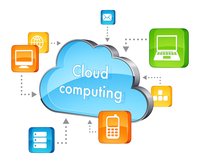
3. Cloud Computing

There is certainly a lot of hype around cloud computing, but few technology providers have done a good job explaining or providing services that are relevant to the average person. 
The two most notable exceptions are Google and Apple. Google Docs is arguably the first cloud-based app that gained mainstream traction. Apple’s iCloud looks like it has the potential to cross the chasm and move the early majority into the cloud. 

With tomorrow’s cloud computing, all of our personal information and the applications will be available to us at any time. Whether you’re editing a text document while riding a train, or adjusting a sales proposal at a client’s office, you’ll never be without the information needed to complete a task.

2. 3G and 4G Wireless Broadband

“How many bars do I have?” We’re frequently checking smartphone signal strength when wirelessly browsing the Internet and retrieving our email. Today’s 3G and 4G networks provide acceptable but intermittent connections and okay speed. This must change.

The deployment of today’s cell towers is a slow, deliberate and costly affair. In the future, deployment will be faster and more organic. Wireless providers will likely credit homeowners’ monthly bills for having devices like AT&T’s 3G MicroCell at home. With enough of these devices in place, even remote neighborhoods and towns will enjoy solid wireless access to the cloud.

So in the future, personal mobile computers (PMCs) won’t even have signal strength indicators; wireless access to the cloud will be pervasive and ultra-fast at all times.

1. Smartphones


Smartphones, like today’s iPhone, are as much a computer as they are a communication device. Besides having a great multi-touch interface and fast CPU, they contain sensors like cameras, gyros, accelerometers, GPS and compasses. They allow us to calculate and communicate anytime, anywhere

In the future, they’ll evolve into personal mobile computers (PMC). Assuming that Moore’s law holds true, mobile CPUs with near super-computing speeds will be entirely possible. The number, accuracy and performance of sensors will grow, the combination of which will give the user a very powerful sense of her surroundings.

Your PMC will move to your wrist and take the place of your watch. (Microsoft had this vision with SPOT, but the technology came too early and was too limited.) The device’s display will not need to be your primary user interface (UI), so the PMC can be a small, diverse fashion statement like today’s watches. The primary UI will become personal peripherals, like information glasses and headsets. You’ll be able to interact naturally in a visual and audible way. 

Your PMC and personal peripherals will become your interface to every other computer, device and machine you interact with. The only UI you will ever need to know is that of your PMC.
Not only will your personal peripherals allow you to explicitly interact with the digital (and physical) worlds, but they’ll also provide subtle cues to your subconscious. While looking through your information glasses, a restaurant might emit a subtle, warm blue tint because it was reviewed positively by patrons. It will feel like a good place to eat. Are your spidey senses tingling?

Source : Mashable | images via google


Sunday, 18 May 2014

iPhone 6 with larger, sharper 1704 x 960 resolution screen in testing. .

New inside reports on the development of the iPhone 6 have indicated that the resolution of the awaited iPhone 6 will have a screen resolution with a width of nearly 600 more vertical and over 300 more horizontal pixels than the current outgoing 5S.

In talks with 9to5Mac, Apple insiders relayed how the company was testing a very-nearly full HD resolution of 1704x960 for the next-generation iPhone.

Although the base resolution of the screen is likely to remain the 568x320 found on current iPhones, the company is purportedly utilizing pixel-tripling technology to boost that original resolution to what appears to be 1704x960. Pixel-doubling is used on current iPhones to boost the base 568x320 resolution to the 'retina' level of 1136x640 but pixel-tripling is more rarely used due to the intricacy of the techniques involved.


The display found on the iPhone 6 is likely to be a larger model than that currently found on the device and it is possible that two sizes will be offered. Either way, pixel-tripling will lead to impressive results as some quick calculations show that a 4.7" device with a resolution of 1704x960 would end up with a pixel density of 416ppi whereas a larger 5.5" device would have a lower but still very high pixel density of 355ppi. By contrast, the iPhone 5S has a pixel density of 326ppi. Whatever display size is used, the company is likely to stick to the 16x9 aspect ratio currently used.

If the reports given to 9to5Mac prove to be correct, then iOS's interface may have to be overhauled to fit the radically-changed resolution or else all of the onscreen elements such as buttons, menus and icons will appear large and fuzzy due to the up-scaling. Images will have to be revamped in a higher resolution for the current feel of the operating system to be maintained on such a high resolution.


With no details on the iPhone 6 being offered except from rumors, we shall have to wait and see before today's reports can be confirmed. If they do prove to be true, however, then the new iPhone launching this September could well be the largest, highest-resolution iPhone yet.

Source: TechRadar via 9to5Mac | Image via 9to5Mac

Surface Pro 3 specs and pricing spotted


During the past couple of weeks, Neowin has been looking at the upcoming Surface mini press event with a bit of suspicion that the 'mini' portion of the event is a bit of smoke and mirrors to cover up the fact that the entire Surface family is about to undergo some change. To that degree, we uncovered the specs of the Surface mini and even that we were hearing that Intel would be playing a big part of the event as well.

While Microsoft had previously said that Surface Pro 3 reference that was spotted was 'accidently' posted up on a support page was a simple mistake, it looks like the Surface Pro 3 just got a lot more real as pricing and specs of the devices have been uncovered.

The folks over at WPcentral appear to have gotten their hands on the SKUs that will be announced Tuesday as the pricing information is now being pushed out to retail databases and here is what is known, or at least presumed to be, the Surface Pro 3 information.

For starters, there will be five, yes five, variations of the product that span the entire pricing range:
  • i3-4GB RAM-64GB - $799
  • i5-4GB RAM-128GB - $999
  • i5-8GB RAM-256GB - $1299
  • i7-8GB RAM-256GB - $1549
  • i7-8GB RAM-512GB - $1949
There will also be some new covers as well, but this is where the information is a bit more aloof as we already believe that the Surface mini will have its own variation for a cover too. Anyways, the new covers are expected to come in Cyan, Purple, Black and Red; the red cover could be limited to Microsoft retail outlets.

All of this information falls in scope of what we have been hearing for some time, that Microsoft wants to create an entire 'family' of Surface products that span a wide range of prices, as well as functionality. That 'family' functionality could be determined by its size, such as the rumored 12in variant of the Surface and the smaller 8in size too. When you bring the current 10in size into the picture, if all of the above holds true, then Microsoft would have Surface products at all of the popular tablet and mobile PC sizes. 

Microsoft's Surface mini press conference is scheduled for Tuesday (and we will be there) and based on all of the leaks, it is turning out to be a product packed event.

Source: WPcentral |  Neowin.net
image via google

Thursday, 8 May 2014

The DermoScreen, The app that detects Skin cancer

Doctors are warning people about the skin cancer as the height of summer approaches. And if anyone get any unusual looking moles should be checked by the doctors.

But the process of diagnose can be a long-winded and in some cases can be complicated.


But not to worry, A Houston Professor is hoping to cut the time that takes in the diagnose and making an smartphone app to identify cancerous cells - and he even claim that it is more accurate than a doctor. 

DermoScreen is now being evaluated at the university of Texas MD Anderson Cancer Centre.
If evaluations are successful, it could be very usefull to the patients that can't afford the medical specialist.

George Zouridakis, Professor of Engineering at Houston University said, "The goal is to provide quick and inexpensive screening in rural or in developing countries of the world where generally medical care generally isn't available." He also said that he wants to make sure it is as accurate as possible. He is also looking for other diagnostic uses by the help of the technology.

Early testing proved the device to be 85% correct, based on visual characteristics.

Once launched, if the lesions spotted on the app were suspected to be cancerous, the patient would be referred for the follow-up.

In addition to a mobile phone, the technology uses a dermoscope attachment (a special magnifying lens) and gives special illumination of the area being photographed.

The Doctor Mole App:

The Doctor Mole app: uses augmented reality to check moles for irregularities in colour, size, shape and border. But the app should not be used as an alternative to seeing a doctor.

Source:  Dailymail.co.uk
images via  Dailymail.co.uk

Wednesday, 7 May 2014

Wall Mounted Bluetooth Speaker db60

Want a high quality audio that lets you enjoy those amazing music at home? Take a look at db60, the wall mounted Bluetooth speaker should be a nice solution. The db60 is a premium quality, award-winning Bluetooth wireless speaker that measures 268 x 195 x 160mm and weights 4.5kg.

As we can see from the images, the wireless speaker features sleek modern design, and comes with a specially designed shielded 4-inch Coaxial driver that is actually two drivers in one in order to produce high-quality room-filling audio for your favorite music. Moreover, the Bluetooth speaker also has an extra 3.5mm audio jack for other non-Bluetooth music players, and an built-in USB port allows to charge your smartphone just like a USB charger, while the integrated wing keeps your device in place when it’s charging do connecting with the wireless speaker. 


 Apart from that, its mount system allows you to easily mount the wireless speaker on the wall. At present the team of the db60 is raising fund at Kickstarter. Pledging £139 (approx $225) will let you own the wall-mounted Bluetooth speaker. If you’re interested, jump to Kickstarter official site for more details. [Via]


Monday, 28 April 2014

Spybot - Search & Destroy 2.3.39


Spybot - Search & Destroy is an anti-malware application designed for on-access and on-demand scanning and removal of various kinds of malware, including spyware, adware, hijackers and trojan horses. Spyware silently tracks your surfing behaviour to create a marketing profile for you that is transmitted without your knowledge to the compilers and sold to advertising companies.

Spybot not only provides detection and removal of adware and spyware but also antivirus protection. Spybot v2.3 includes a Professional Edition license valid for 30 days, so you can try and test all the features of the program.

What's new in this version:
  • New enhanced detection methods. This means better protection against the new wave of spyware, rootkits  and viruses.
  • Scanning and cleaning is now much faster. Tweaked the scanning engine so it now scans faster and some cleaning tasks are now fully automated.
  • Improved Startup Tools. These powerful tools now work with even the latest Windows Operating Systems.
  • SDScan now runs automatically with escalated privileges. This means no more annoying restarts and no need to run SDCleaner.
  • New ‘Notifications’ feature: Spybot can now be configured to send the results of scans on your PC to your mobile device, server, chat or website. You no longer have to wait around while Spybot is doing a scan. As soon as your scan finishes a message will be sent to your chosen device and you will be informed of possible threats. This means you can react and make decisions on what action to take much faster.
Download: Spybot - Search & Destroy 2.3.39 | 44.2 MB (Freeware)
View: Spybot Search & Destroy Website | Release Notes

Bandizip 3.11 Build 10753


Bandizip is Lightweight, Fast, and Free archiving software and it works with WinZip, 7-Zip, WinRAR and other archive formats. It handles the most popular compression formats, including Zip, 7z, and Rar files for free! Bandizip supports for ZIP, 7Z, RAR, ALZ, EGG, TAR, BH, LZH, GZ, BZ2, ISO, CAB, WIM, XZ, ARJ, and Z archives files and users can create self-extracting files (.EXE) and multi-volume (split) archives files. Bandizip is 100% free Archiver for home and office.

Bandizip has a very fast Zip algorithm for compression & extraction by Fast Drag and Drop, High Speed Archiving, and Multi-core compression function.


Bandizip supports the following features:
  • Packing and Unpacking: Zip(z01), ZipX(zx01), TAR, TGZ, 7Z(7z.001), and EXE(e01)
  • Unpacking Only: RAR(part1.rar, r01), ACE, ALZ, APK, ARJ, BH, BZ, BZ2, CAB, EGG, GZ, J2J, JAR, IMG, IPA, ISO, LHA, LZH, LZMA, PMA, TBZ, TBZ2, TGZ, TLZ, TXZ, UDF, WAR, WIM, XZ, Z
  • Support unicode to display international characters which display for filenames in archives
  • Bypass the bad compression files automatically by "High Speed Archiving" function
  • Extract the files to the destination folder directly by "Fast Drag & Drop" function
  • Create self-extracting file (.EXE) and multi-volume (split) archives
  • Optional archive encryption using ZipCrypto and AES 256
  • Context Menu access including "Preview Archive" function
  • Create or extract multiple zip files simultaneously from windows explorer
  • Free to use at both home and in the office
  • Operating system: Windows 2003, XP, Vista, 7, 8 (Support for 32-bit and 64-bit)
Download: Bandizip 3.11 Build 10753 | 4.1 MB (Freeware)
Download: Portable Bandizip 3.11 Build 10753 | 2.3 MB
View: Bandizip Home Page


Adobe Flash Player 13.0.0.206


Adobe Flash Player is the high performance, lightweight, highly expressive client runtime that delivers powerful and consistent user experiences across major operating systems, browsers, mobile phones and devices.

Installed on over 750 million Internet-connected desktops and mobile devices, Flash Player enables organizations and individuals to build and deliver great digital experiences to their end users.
  • Immersive experiences with Flash video, content and applications with full-screen mode.
  • Low-bandwidth, high-quality video with advanced compression technology.
  • High-fidelity text using the advanced text rendering engine.
  • Real-time dynamic effects with filters for Blur, DropShadow, Glow, Bevel, Gradient Glow, Gradient Bevel, Displacement Map, Convolution, and Color Matrix.
  • Innovative media compositions with 8-bit video alpha channels.
  • Blend modes, radial gradient, and stroke enhancements.
  • Additional image formats: GIF, Progressive JPEG, and PNG.
 
Download for Firefox, Safari, Opera: Adobe Flash Player 13.0.0.206 | 17.1 MB (Freeware)
Download for Internet Explorer: Adobe Flash Player 13.0.0.206 | 16.5 MB
Download: Adobe Flash Player Uninstaller 13.0.0.206 | 825 KB
View: Adobe Flash Player Website | Release Notes (Not yet available)

Firefox 29.0 released for download


Mozilla Firefox is a fast, full-featured Web browser. Firefox includes pop-up blocking, tab-browsing, integrated Google search, simplified privacy controls, a streamlined browser window that shows you more of the page than any other browser and a number of additional features that work with you to help you get the most out of your time online.

The Web is all about innovation, and Firefox sets the pace with dozens of new features to deliver a faster, more secure and customizable Web browsing experience for all.

User Experience. The enhancements to Firefox provide the best possible browsing experience on the Web. The new Firefox smart location bar, affectionately known as the "Awesome Bar," learns as people use it, adapting to user preferences and offering better fitting matches over time.

Performance. Firefox is built on top of the powerful new Gecko platform, resulting in a safer, easier to use and more personal product.

Security. Firefox raises the bar for security. The new malware and phishing protection helps protect from viruses, worms, trojans and spyware to keep people safe on the Web.

Customization. Everyone uses the Web differently, and Firefox lets users customize their browser with more than 5,000 add-ons.

Download: Firefox 29.0 for Windows | 27.7 MB (Freeware)
Download: Classic Theme Restorer (Customize Australis)
Download: Firefox 29.0 for Linux | 34.6 MB
Download: Firefox 29.0 for MacOS | 56.1 MB
View: Firefox Website | Release Notes (Not yet available)

The 3 Most Incredible PCs of April 2014


I’ve got three completely eye-popping PCs that are all very different. Two feature cases you can buy from and PC retailer, but have been modified to the extent you’d never know. We’ve also got a scratch-build PC that’s wall-mounted too so head on down the page to see them all.

 First up is a very recognizable face from the film Despicable Me. A Minion might seem an odd choice for a racy PC modding project but while the outside will no doubt make a few people giggle but the inside of PC modder Ronnie Hara’s aptly-called Minion Mod, is absolutely awesome-looking.

As well as a superb yellow paint job being applied to the Cooler Master Cosmos II PC case, the vibrant color continues inside with a water-cooling system that deals with the heat produced by the PC rather than using traditional fan coolers. The tubing is made from solid acrylic, which needs to be bent to shape or include regular joints as we can see here.  


The PC uses an MSI MPower MAX motherboard and R9 270X HAWK graphics card along with water-cooling components from Alphacool and Phobya. If you want to see how the project was made, head over to modding website bit-tech to see Ronnie’s extensive project log that includes more photos.


Next up is something very different. In fact, you almost wouldn’t recognize this as being a PC. In fact it uses some pretty high-end, albeit slightly dated hardware and a liquid cooling system –
all mounting to an illuminated panel and suspended on a wall.


It’s a pretty neat way to save on floor and desk space, and we imaging that even though the PC is water-cooled, performing maintenance and upgrades will be very easy.


You can see the project log and more photos by heading here.


The final project I’ll be posting here this month is also one of the smallest you’ll ever see too. The case is made by Fractal Design and is known as the Node 304, which uses tiny mini-ITX form factor motherboards.


It’s little bigger than a shoebox but this hasn’t stopped forum user MetallicAcid from cramming in a ton of high-end hardware including  an Asus GTX 770 Direct CU graphics card, a 25GB Samsung Evo SSD and an Intel INTC -1.8% Core i7 CPU, with the latter being cooled by a Corsair H80i all-in-one liquid cooler


However, it’s not even that shiny hardware that caught our eye. Externally, the project looks spectacular, with a stark white paint job that contrasts plenty of glowing acrylic in this super-clean build called Fractal Effect 304. You can see the project log over at www.linustechtips.com.

That’s it for this month – do let me know what you thought of the PCs in the comments below and don’t forget to follow me to see more next month.

Saturday, 26 April 2014

Hale Dreamer Alarm Clock Speaker Android Dock

Hale Dreamer Alarm Clock Speaker Android Dock tell you when it’s time to rise and shine
to sleep is not always as easy as laying down and shutting your eyes. For many, there is a bit of science to it. There needs to be little or no light, music or silence, and your phone either needs to be set to vibrate or have the volume turned down so you’re not woken up by every text. There is a nighttime mode that will screen calls for you, but there are docking systems out there that will cater to your specific needs a little bit better.


The Hale Dreamer Alarm Clock Android Dock is a multi-function alarm clock that will give you the ability to do much more than just charge your phone. It has SmartSilence, which will silence your phone unless there’s an emergency, and it can act as a sound machine that has a optional shut-off timer with fade-out. In addition to giving you actual buttons to press, it plugs into your audio jack and micro USB to charge up your phone and play music through its 10w, full-range speakers.

There is a snooze button, as well as brightness and volume knobs. From this alarm clock, you’ll be able to set everything just the way you like it. You can choose how often you repeat your alarm, wake up to custom tones, the snooze length, and the numeral style. This will cost you around $80, which isn’t too bad for a docking system. The only thing it lacks is the light coming on gradually with your alarm. [Via]

Friday, 25 April 2014

IBM launches new server model to tackle big data, analytics

NEW YORK: International Business Machines, in its latest attempt at reviving demand for its hardware products, is launching high-end system servers that it says are 50 times faster than its closest competitor at analyzing data.

The POWER8 servers, the product of a $2.4 billion, three-year investment, are part of the company's decade-long shift to higher-value hardware technology. IBM said the machines are 50 times faster than the low-end x86-based servers it sold to Chinese PC maker Lenovo in January.

The technology services provider said it hopes the servers, designed for large-scale computing, will appeal to clients looking to manage new types of social and mobile computing and mass amounts of data.

Last week, the company reported its lowest quarterly revenue in five years, weighed down by falling demand for its storage and server products.

IBM dominates the higher-end server market with 57% market share, according to research firm Canalys.

"For IBM customers in particular the POWER8 represents a generational jump forward so far as overall performance and system capacity goes," said Charles King, an analyst at Pund-IT in California.

"POWER8 should help IBM move forward in this very cloud-centric, analytic path that it has been working on," he said.

Some analysts, however, say that IBM's shift to high-end servers makes products like POWER8 appealing only to niche customers.

"Not every app needs a high-end server," said Jefferies analyst Peter Misek. "With IBM getting out of that lower-end business, it dramatically shrinks their addressable market."

In order to make the servers adaptable to different needs, IBM released the data specifications for its POWER8 processor to the OpenPOWER foundation, allowing the development community to deliver new system designs based on POWER8.

The foundation, whose more than two dozen members include Google, Israeli chip designer Mellanox Technologies , US chip-maker Nvidia and Taiwan-based server supplier Tyan Computer, will have access to hardware previously proprietary to IBM.

Monday, 21 April 2014

NASA: Engineer Vital to Moon Landing Success Dies

 
John C. Houbolt, an engineer whose contributions to the U.S. space program were vital to NASA's successful moon landing in 1969, has died. He was 95.

Houbolt died Tuesday at a nursing home in Scarborough, Maine, of complications from Parkinson's disease, his son-in-law Tucker Withington, of Plymouth, Mass., confirmed Saturday.

As NASA describes on its website, while under pressure during the U.S.-Soviet space race, Houbolt was the catalyst in securing U.S. commitment to the science and engineering theory that eventually carried the Apollo crew to the moon and back safely.

His efforts in the early 1960s are largely credited with convincing NASA to focus on the launch of a module carrying a crew from lunar orbit, rather than a rocket from Earth or a space craft while orbiting the planet.
 
Houbolt argued that a lunar orbit rendezvous, or lor, would not only be less mechanically and financially onerous than building a huge rocket to take man to the moon or launching a craft while orbiting the Earth, but lor was the only option to meet President John F. Kennedy's challenge before the end of the decade.

NASA describes "the bold step of skipping proper channels" that Houbolt took by pushing the issue in a private letter in 1961 to an incoming administrator.

"Do we want to go to the moon or not?" Houbolt asks. "... why is a much less grandiose scheme involving rendezvous ostracized or put on the defensive? I fully realize that contacting you in this manner is somewhat unorthodox, but the issues at stake are crucial enough to us all that an unusual course is warranted."

Houbolt started his career with NASA's predecessor in Hampton, Va., in 1942, served in the Army Corps of Engineers, and worked in an aeronautical research and consulting firm in Princeton, N.J., before returning to NASA in 1976 as chief aeronautical scientist. He retired in 1985 but continued private consulting work.

Born April 10, 1919, in Altoona, Iowa, Houbolt grew up in Joliet, Ill., and earned degrees in civil engineering from the University of Illinois at Urbana-Champaign. He earned a doctorate from the Swiss Federal Institute of Technology at Zurich in 1957.

Google Acquires Titan Aerospace, The Drone Company Pursued By Facebook


Google has acquired Titan Aerospace, the drone startup that makes high-flying robots which was previously scoped by Facebook as a potential acquisition target (as first reported by TechCrunch), the WSJ reports. The details of the purchase weren’t disclosed, but the deal comes after Facebook disclosed its own purchase of a Titan Aerospace competitor in U.K.-based Ascenta for its globe-spanning Internet plans.

Both Ascenta and Titan Aerospace are in the business of high altitude drones, which cruise nearer the edge of the earth’s atmosphere and provide tech that could be integral to blanketing the globe in cheap, omnipresent Internet connectivity to help bring remote areas online. According to the WSJ, Google will be using Titan Aerospace’s expertise and tech to contribute to Project Loon, the balloon-based remote Internet delivery project it’s currently working on along these lines.

That’s not all the Titan drones can help Google with, however. The company’s robots also take high-quality images in real-time that could help with Maps initiatives, as well as contribute to things like “disaster relief” and addressing “deforestation,” a Google spokesperson tells WSJ. The main goal, however, is likely spreading the potential reach of Google and its network, which is Facebook’s aim, too. When you saturate your market and you’re among the world’s most wealthy companies, you don’t go into maintenance mode; you build new ones.

As for why an exit to Google looked appealing to a company like Titan, Sarah Perez outlines how Titan had sparked early interest from VCs thanks to its massive drones, which were capable of flying at a reported altitude of 65,000 feet for up to three years, but how there was also a lot of risk involved that would’ve made it difficult to find sustained investment while remaining independent.

Google had just recently demonstrated how its Loon prototype balloons could traverse the globe in a remarkably short period of time, but the use of drones could conceivably make a network of Internet-providing automotons even better at globe-trotting, with a higher degree of control and ability to react to changing conditions. Some kind of hybrid system might also be in the pipeline that marries both technologies.
Titan Aerospace also represents just the latest in a string of robotics acquisitions Google has been making lately, which include Boston Dynamics and seven other companies purchased to help fuel its experimental robotics program under Andy Rubin. There’s no question Google has bots on the brain, but thanks to Loon ambitions, the reasoning behind the Titan buy might be the most transparent yet.

Google Launches Chrome Remote Desktop On Android, Allowing Mobile Access To Your PC


Google this morning launched a mobile client application called “Chrome Remote Desktop app for Android” (whew!) which allows for remote access to your Mac or PC from your Android device, whether smartphone or tablet. The new app is an extension of Google’s previously launched Chrome Remote Desktop screen-sharing service, which allows you to share your desktop’s screen with other Chrome browser or Chromebook users.
 
As with its big-screen counterpart, to use the Android application you first have to install a helper application on your desktop or laptop computer. That app is here in the Chrome Web Store and works on Windows (XP and above), Mac (OS X 10.6 and above) and Linux computers. The helper app installs as an extension to Google Chrome or the Chrome-based OS that powers Google’s Chromebooks.

Once installed, however, you’ll be able to open the app and connect to any of your computers with just a tap, manage them, and navigate through their files and folders from afar — like a modern version of GoToMyPC, for example.
We’ve known an Android client was in the works for some time, as there was even a functional version of the Android client available back in January, though it required that you compile the app from source in order to use it. An iOS version is also in the works, but its development is said to be further behind.

The move comes at a time when competitor Amazon is targeting enterprise users with its own version of remote access software, Amazon Workspaces. Officially launched to the public in March, this service similarly lets company employees access their work computers from any device, including Mac, PC, iPhone, iPad, Android or Kindle Fire HDX tablets. Of course, in Amazon’s case, the goal is to make its tablets appear more business-friendly.
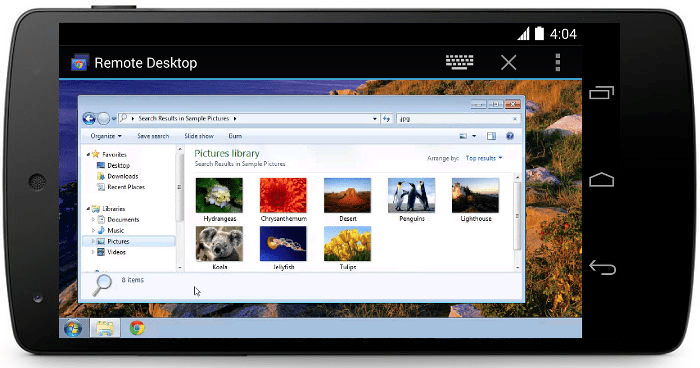
Google’s Remote Desktop, on the other hand, has a more consumer-focused vibe, which even had the company once touting the service as a way to be the family hero by “adjusting printer settings on your mom’s computer to finding a lost file on your dad’s laptop,” for example.
The official Chrome Remote Desktop Android app is available here on Google Play.

Google’s Project Tango Includes Tech Apple-Acquired 3D Imaging Company PrimeSense


If you want a hint of what might be on the horizon at Apple, look to Google – or at least look to its Project Tango experimental 3D depth-sensing smartphone. Tango got a teardown just the other day, and later on iFixit determined that one of its key components comes from what is now an Apple subsidiary (via 9to5Google), thanks to a deal that wrapped up last November.

PrimeSense, which is the company Apple acquired, is responsible for the 3D imaging system-on-a-chip contained within the Tango developer hardware, which is responsible for processing the data gathered by its four cameras and turning that into a 3D map of its surroundings for use by the hardware, system software and developer applications.

iFixit had noted that Tango’s tech worked similarly to early versions of Microsoft’s Kinect sensor for Xbox and Windows, and PrimeSense is actually responsible for having created that tech to begin with. Apple’s uses for PrimeSense aren’t yet known, but some have suggested it could be incorporated into future Apple TV hardware for gesture-based control. The possibility that it might also add Tango-like features to Apple mobile devices is perhaps more tantalizing, however, and this precedent is definitely a promising sign in that direction.

Google Camera App Brings Lens Blur Background Defocus To Any KitKat Android Devices


Google has a new standalone camera app available in the Google Play app store, and it can be installed on any smartphones or tablets running KitKat 4.4 or higher. The new app will also be rolling out to other devices in the future according to Google, so that might expand beyond just KitKat to those on other versions of Android.

The app offers a 100 percent viewfinder to show you exactly what you’re shooting without blocking the view with interface elements, and also offers a few trick modes for taking pictures including Lens Blur, Panorama, and Photo Sphere. Lens Blur offers background defocusing effect like those introduced by most smartphone manufacturers on their latest generation flagship smartphones, so it’s nice to see that kind of stuff democratized.

The Lens Blur feature in practice is kind of tricky to get right, as it required you shifting your phone upwards while remaining centered on your focal point. Samsung’s requires holding your phone in the same place for a while but produces more reliable results in my experience, and HTC’s needs its dual camera hardware in the new HTC One M8 but offers up strangely similar finished products. If used in the right circumstances, Lens Blur works remarkably well at mimicking the kind of depth of field you can capture from DSLRs.

Photo Sphere offers the ability to capture full, 360 degree immersive snapshots and is an extension of the kind of feature you’ll find from Panorama, but not limited to the horizontal plane. It’s the first time Google has made this available to non-Nexus devices, so check it out. I tried installing this on a Galaxy S5 without issue, and it’s a nice alternative if you’re not a fan of or are overwhelmed by the options of the stock offering of whatever device-maker you’ve chosen. Some users on Twitter report having issues getting the app to recognize your phone’s camera hardware, but a quick reboot should do the trick.

Facebook ‘Nearby Friends’ Will Track Your Location History To Target You With Ads

Facebook says it’s not using its new Nearby Friends feature to target ads yet, but after I asked why it’s tracking “Location History” it admitted it will eventually use the data for marketing purposes.
This morning, the proximity sharing feature began rolling out to iOS users after it’s launch yesterday, and with it I discovered a new “Location History” setting that must be left on to use Nearby Friends.
 For an overview of how the Nearby Friends option lets you share your proximity or real-time exact location, and its privacy implications, read my feature article from yesterday’s launch.

The description below the Location History setting in Nearby Friends reads “When Location History is on, Facebook builds a history of your precise location, even when you’re not using the app. See or delete this information in the Activity Log on your profile.” Notice the careful use of ‘builds a history’ instead of the scarier word ‘tracks’.

Behind the Learn More link, Facebook explains that you can turn this tracking off but, “Location History must be turned on for some location feature to work on Facebook, including Nearby Friends.” It also notes that “Facebook may still receive your most recent precise location so that you can, for example, post content that’s tagged with your location or find nearby places.” So even if you turn it off, Facebook will still collect location data when necessary it did before Nearby Friends debuted.

If you leave it on, you’ll see your coordinates periodically added to your Activity Log. However, you’ll only see your Location History if you scroll to the bottom of the filter options and look at this category of data specifically. It’s a bit sketchy that these maps don’t show up in the default view of Activity Log like most other actions.  It’s almost like Facebook is trying to discourage use of the Clear Location History button:


There are plenty of ways Facebook could use this data to make your experience better. The company says “Location History helps us know when it makes the msot sense to notify you (for example, by making sure we don’t send you a notification every time a Facebook friend who works with you is also in the office).”

By tracking where you are, Facebook could show you more relevant News Feed stories from friends or Pages nearby. For example, if Facebook sees I’m in the North Beach district of San Francisco instead of my home district of the Mission in the South of the city, it might increase the likelihood that I’d see status updates from friends who live up there, or an Italian restaurant in the area whose Page I Liked. It could also suggest Events happening nearby.

If I travel far from home, say to London, Facebook could show more posts from friends who live there or Pages based in the U.K. It could also know not to show me checkins or Events from home that would be irrelevant while I’m away.

 Location Advertising

But there are also big opportunities for Facebook to use Location History to help itself make money. When I asked if it could power advertising, a Facebook spokesperson told me “at this time it’s not being used for advertising or marketing, but in the future it will be.”
It wouldn’t confirm exactly how, but I foresee it targeting you with ads for businesses that could actually be in sight or just a few hundred feet away. An ad for a brick-and-mortar clothing shop would surely be more relevant if shown when you’re on the same block. The ability to generate foot traffic that leads to sales could let Location History-powered Facebook ads generate big returns on investment for meatspace business advertisers. That means they’d be willing to pay more for these hyper-local ads than for ones pointed to users who are far away and much less likely to visit their store.


Facebook’s own VP Carolyn Everson discussed how she imagined Facebook ads might evolve in a call with Bloomberg in 2012, saying “Phones can be location-specific so you can start to imagine what the product evolution might look like over time, particularly for retailers”. And back in 2011, Facebook acquired a hyperlocal ad targeting startup called Rel8tion.
Luckily, Facebook says that putting Location History in the Activity Log “gives people a way to view and delete the underlying data.” That’s a relief, as it means you could use Nearby Friends with Location History turned on and then clear your history in the Activity Log to prevent that data from being used for marketing if you’re really concerned about that. The company explains that “When you hit delete we remove data from the user interface immediately and start working to permanently delete the data from the system.”

While there’s always a vocal minority angry about Facebook’s aggressive ad targeting, and the wider public is generally uneasy about it, we’ve seen that these feelings don’t necessarily change people’s behavior in the long-term. That ‘s why Facebook is still thriving with big revenues. And over time I believe the world will get more comfortable with ad targeting. There’s going to be ads on Facebook no matter what, and I personally would rather see relevant ones for local businesses than ads for random apps or websites.

Still, the realization that Location History will be used for ad targeting could scare some people away from using Nearby Friends.

This sentiment is dangerous for Facebook because Nearby Friends is off by default and users have to actively turn it on. It’s also stuck in the navigation menu of its main iOS and Android apps. If users turn it off or refuse to turn it on in the first place, it may be too buried for them to voluntarily go in and activate it.

Facebook may have anticipated this, which could partly be why it plans to use News Feed teaser stories like “4 friends are nearby” to try to coax users into turning on Nearby Friends and Location History. With both social and marketing privacy concerns looming, though, Facebook will have to clearly demonstrate that Nearby Friends makes your life better by helping you gather with friends, or people won’t give up their data to use it.