Norton AntiVirus defends your computer against viruses, spyware,
worms, bots, and other malicious software while minimizing the
performance impact onto your computer. This enhanced protection system
features multi-layered protection technologies that work simultaneously
to proactively block cyber-attacks and detect and remove malicious
threats before they can harm your PC. Norton AntiVirus offers a quick
install time, fast boot time and has low memory needs which reduce the
burden onto a system.
With this release, you’ll experience better-than-ever 4 layer
protection system that will quickly detect and eliminate almost any
threat, no matter where you go or what you do online. Cloud based Norton
Management lets download, install, transfer, update or renew Norton
products from anywhere right over the internet.
Key Benefits:
- Best protection and performance ever
- Compatible with Microsoft Windows 8 and Windows 8 Pro (32-bit and 64-bit)
- Norton Protection System: Four unique layers of protection keep you
and your Stuff safe from threats, so you can go more places and do more
things online without worry.
- Browser Protection: Gives you the freedom to safely surf, shop,
socialize, and enjoy all of your favorite online activities by stopping
online threats before they can reach you and your Stuff.
- SONAR 4 Behavioral Protection: Protects you and your Stuff from
threats that haven’t even been identified yet, so you can share files
and go online safely, without having to wait for updates.
What's new in this version:
- Added a new client with updated and secure version of OpenSSL
- Patched IDSafe which also picks up the new client build
- Fixed an issue where Norton Product crashes when Norton Tasks window kept open.
- Fixed an issue where users were unable to login/logout from the Norton Main User Interface
- Few in-field fixes
Download: Norton AntiVirus 2014 21.3.0.12 | 281 MB (Shareware)
View: Norton Antivirus Website | Release Notes
Source: Neowin..net | Iimages via neowin
Tunes is a free application for Mac and PC. It plays all your digital
music and video. It syncs content to your iPod, iPhone, and Apple TV.
And it's an entertainment superstore that stays open 24/7.
- Organize your music into playlists
- Edit file information
- Record compact discs
- Copy files to an iPod or other digital audio player
- Purchase music and videos on the Internet through the built-in iTunes store
- Run a visualizer to display graphical effects in time to the music
- Encode music into a number of different audio formats.
This update includes the following improvements:
Improved Podcast Browsing
- Quickly find episodes you haven't listened to in the new Unplayed tab
- Browse episodes that are available to download or stream in the Feed tab
- Save your favorite episodes to keep them on your computer
- Episodes can now be automatically deleted after you play them
This update also resolves an issue where iTunes may become
unresponsive when updating Genius and improves overall performance and
stability. Podcasts for iOS 2.1 or later is recommended when syncing
podcast episodes.
Thanks to Frank B. for posting in our forums!
Download: iTunes 11.2 32-bit | iTunes 11.2 64-bit |~100 MB (Freeware)
View: Apple iTunes Website
Apple Maps:
Many new iPhone users may be a bit upset with
the functionality of the integrated Apple Maps within iOS 6. Many of the
phone’s users have reported incomplete search results as well as a host
of inaccurate instructions within the turn-by-turn features of the app.
The last thing you want is to put trust into an inaccurate GPS system.
The best thing to do is to wait until the software has been fixed and
has become more reliable. The good news is that there are plenty of
alternatives that you can use to get you to and from your destinations.
Let’s talk about the 5 best navigation apps for iPhone and what you can
expect from using them.
1. Waze – Free:
One of the best things about Waze is that
it is 100% free. This GPS app offers GPS navigation and it also has the
function to display detailed traffic information. It is unique in that
it pulls all of its traffic information from a user created resource.
Now, this can be accurate and beneficial just as long as the other Waze
members are nearby. If you live in a rather secluded area, you might
want to look elsewhere for traffic details.
2. GPS by Telenav – Free:
Telenav
is yet another great free GPS app that has a lot of features. One thing
that may turn off some potential users is that some of the more
advanced apps require a monthly subscription charge. Users who vouch for
the free service can expect to get turn by turn directions (without
voice), landmark search, and up to date traffic and map details. The
users who decide to go for the full version can expect voice
functionality, rerouted directions based on road hazards or traffic jams
as well as speed trap notifications.
3. Motion X GPS – 0.99:
Motion
X GPS is a very affordable GPS app that has quite a bit to offer. Users
will have the ability to receive driving directions, walking, running,
boating and other directions and heaps of other features. The app
features turn by turn directions, but in order to unlock the voice
assisted directions, you must dish out 9.99 a year. This may turn some
people away, but it’s still one of the more affordable GPS apps that you
can find.
4. CoPilot Live Premium HD – 12.99:
CoPilot
Live Premium HD is a high-end GPS app that has a lot of features and
offers some great directions. This is only beneficial for those who live
in the United States, as it only covers U.S. regions. In this app you
will have access to a huge database of interests as well as turn by turn
directions. Along with the great voice enabled directions, you can also
expect to find a huge assortment of 3D and 2D maps.
5. Navigon North America – 49.99:
This
app is a bit on the pricey side, but for what you’ll get with the cost,
you should be more than happy. You’ll have access to many U.S., Mexico
and Canadian GPS maps that integrates Google search for points of
interest.
WinRAR is an archiving utility that completely supports RAR and ZIP
archives and is able to unpack CAB, ARJ, LZH, TAR, GZ, ACE, UUE, BZ2,
JAR, ISO, 7Z, Z archives. It consistently makes smaller archives than
the competition, saving disk space and transmission costs. WinRAR offers
you the benefit of industry strength archive encryption using AES
(Advanced Encryption Standard) with a key of 128 bits. It supports files
and archives up to 8,589 billion gigabytes in size. It also offers the
ability to create self extracting and multi volume archives. With
recovery record and recovery volumes, you can reconstruct even
physically damaged archives.
What's new in this version, fixed bugs:
- Beta 3 failed to decompress multivolume encrypted RAR archives;
- "Update" command ("u" in command line mode) could update even files with same modification time;
- Under rare conditions x86 version working in multithreaded mode on
SSE2 enabled CPU could erroneously issue checksum error message for
first file in valid RAR5 archive with BLAKE2sp checksums.
Download: WinRAR 5.10 Beta 4 32-bit | WinRAR 5.10 Beta 4 64-bit | ~1.8 MB (Shareware)
View: WinRAR Website | Release Notes
[Via]
The Microsoft .NET Framework 4.5.2 is a highly compatible, in-place
update to the Microsoft .NET Framework 4, Microsoft .NET Framework 4.5
and Microsoft .NET Framework 4.5.1. The offline package can be used in
situations where the web installer cannot be used due to lack of
internet connectivity. The web installer is a small package that
automatically determines and downloads only the components applicable
for a particular platform.
This is an offline installer. There are separate installers for web
and offline installation. If you intend to redistribute either of these
installers in the setup for your own product or application, we
recommend that you choose the web installer because it is smaller and
typically downloads faster. You can download the web installer here.
Wherever possible, Microsoft recommends you use the Web Installer in
lieu of the Offline Package for optimal efficiency and bandwidth
requirements.
The offline package can be used in situations where the web installer
cannot be used due to lack of internet connectivity. This package is
larger than the web installer and does not include the language packs.
You can download and install the language packs from here.
This version of the .NET Framework runs side-by-side with the .NET
Framework 3.5 SP1 and earlier versions, but performs an in-place update
for the .NET Framework 4, .NET Framework 4.5 and .NET Framework 4.5.1.
Supported Operating Systems:
Windows 7 Service Pack 1, Windows 8, Windows 8.1, Windows Server 2008
R2 SP1, Windows Server 2008 Service Pack 2, Windows Server 2012,
Windows Server 2012 R2, Windows Vista Service Pack 2.
Download: .NET Framework 4.5.2 | 66.8 MB (Freeware)
View: .NET Framework Website | Release Notes
Opera is a Web browser that offers lots of features to let you take
advantage of today's Web. Opera's interface combines precision and
quality. Integrating modern style with powerful features, Opera gives
you the freedom to truly open the web and explore. Surf the Web at
lightning speed. Protect yourself against Internet threats.
Download: Opera 21.0.1432.57 | 26.7 MB (Freeware)
View: Opera Website | Release Notes (Not yet available)
[via]
The K-Lite Codec Pack is a collection of DirectShow filters, VFW/ACM codecs, and tools. Codecs and DirectShow filters are needed for encoding and decoding audio and video formats. The K-Lite Codec Pack is designed as a user-friendly solution for playing all your audio and movie files. With the K-Lite Codec Pack you should be able to play all the popular audio and video formats and even several less common formats.
K-Lite Codec Pack standard variant contains everything you need to play all the common video file formats. It contains Media Player Classic, which is an excellent player for video files. It also has (better) support for playback of DVDs. This pack is recommended for the average user.
There are a lot of good codec packs out there, but a lot contain illegal codecs. K-Lite Codec Pack (Standard) contains nothing but legal and clean codecs. Here you can find a list of all components that are included in the pack.
What's new in this version:
- Updated MPC-HC to version 1.7.4.13
- Updated LAV Filters to version 0.61.2-6-g002d1f2
- Updated madVR to version 0.87.10
- Updated xy-VSFilter to version 3.0.0.288
- Updated MediaInfo Lite to version 0.7.68
- Updated Codec Tweak Tool to version 5.8.0
- Updated Icaros to version 2.2.5 b1
- Improved broken filter detection
Download: K-Lite Codec Pack Standard 10.4.5 | 17.4 MB (Freeware)
View: K-Lite Codec Pack Website
Internet Download Manager (IDM) is a tool to increase download speeds by up to 5 times, resume and schedule downloads. Comprehensive error recovery and resume capability will restart broken or interrupted downloads due to lost connections, network problems, computer shutdowns, or unexpected power outages. IDM integrates seamlessly into Internet Explorer, Chrome, Opera, Firefox, Avant Browser, and all other popular browsers to automatically handle your downloads. You can also drag and drop files, or use Internet Download Manager from command line. The program supports proxy servers, ftp and http protocols, firewalls, redirects, cookies, authorization, MP3 audio and MPEG video content processing.
What's new in this version:
- Added support for Firefox 31 and SeaMonkey 2.26
- Fixed bugs
Download: Internet Download Manager 6.19 Build 8 | 5.6 MB (Shareware, $24.95)
View: IDM Website | Source : Neowin.net
Speccy will give you detailed statistics on every piece of hardware in your computer. Including CPU, Motherboard, RAM, Graphics Cards, Hard Disks, Optical Drives, Audio support. Additionally Speccy adds the temperatures of your different components, so you can easily see if there's a problem!
- Processor brand and model
- Hard drive size and speed
- Amount of memory (RAM)
- Graphics card
- Operating system
At first glance, Speccy may seem like an application for system administrators and power users. It certainly is, but Speccy can also help normal users, in everyday computing life.
If you need to add more memory to your system, for example, you can check how many memory slots your computer has and what memory's already installed. Then you can go out and buy the right type of memory to add on or replace what you've already got.
What's new in this version:
- Added SMART attribute real values and statuses.
- Restructured SMART attributes and RAM JEDEC data into grid view.
- Improved Windows 8.1 compatibility.
- Improved scriptable XML and TXT export support (Professional edition only).
- Improved Network Adaptor detection.
- Improved localization and language support.
- Minor GUI improvements.
- Minor bug fixes.
Download: Speccy 1.26.698 | Portable | 5.0 MB (Freeware)
Screenshots: >> Click Here <<
View: Speccy Website
[Via]
Eliminates deeply embedded and difficult to remove crimeware that traditional virus scanning doesn't always detect.
Norton Power Eraser is a powerful free removal tool that may help you
clean up certain types of difficult to remove security risks. If a
program has hijacked your computer and you are having difficulty
detecting or removing it, Norton Power Eraser may be able to clean your
computer. Norton Power Eraser includes detection and removal
capabilities for security risks that impersonate legitimate applications
(for example, fake antivirus software), often known as "scareware",
"rogueware" or "scamware". You can run this tool to scan for threats
even if you have a Symantec product, or any other security product. If
you cannot start the computer in Normal mode, you can run this tool in
Safe mode.
Norton Power Eraser is easy to download, and scans your computer
quickly to detect the most aggressive computer viruses. You don't need
to install this tool.
Because the Norton Power Eraser uses aggressive methods
to detect these threats, there is a risk that it can select some
legitimate programs for removal. You should use this tool very
carefully, and only after you have exhausted other options.
Download: Norton Power Eraser 4.3.0.13 | 2.9 MB (Freeware)
View: Homepage | Tutorial
CCleaner is a freeware system optimization, privacy and cleaning
tool. It removes unused files from your system - allowing Windows to run
faster and freeing up valuable hard disk space. It also cleans traces
of your online activities such as your Internet history. Additionally it
contains a fully featured registry cleaner. But the best part is that
it's fast (normally taking less than a second to run) and FREE!
Cleans the following:
- Internet Explorer
- Firefox
- Google Chrome
- Opera
- Safari
- Windows - Recycle Bin, Recent Documents, Temporary files and Log files.
- Registry cleaner
- Third-party applications
What's new in this version:
- Added Windows 8.1 Update 1 and Server 2012 R2 Update 1 compatibility.
- Improved Chrome cleaning: Internet History, Last Download Location and Startup item management.
- Improved Opera 15 and newer cleaning: Internet History, Last Download Location and Startup item management.
- Added Firefox plugin activation mode support.
- Improved handling of removed and unmounted disks.
- Improved Windows keyboard shortcut support.
- Improved Shutdown after cleaning and /AUTO command-line.
- Added Wondershare Video Converter Pro, Aimersoft Video Converter Ultimate, Real Player Cloud cleaning.
- Improved Java, Windows Defender, FrostWire, CuteFTP 9, Winamp, FileZilla, SUPERAntiSpyware, OpenOffice 4 cleaning.
- Added Mongolian language.
- Minor GUI Improvements.
- Minor bug fixes.
EagleGet is a convenient download accelerator for you; its
multi-threaded technology can maximize your network bandwidth usage.
EagleGet can help you minimize download time, no matter what kind of
network environment you are in (home, Internet cafes or public Wi-Fi),
and recover downloads that are interrupted for any reason – lost
connections, crashes, etc.
EagleGet features:
- Accelerate downloads by using multi-threaded technology.
- Support MMS, HTTP, HTTPS, FTP and RTSP protocols.
- Support HTTP and SOCKET proxy.
- Batch downloads function.
- Support fully customized User-Agent.
- Automatic refresh expired download address.
- Download files in Chrome, IE, Firefox and Opera with one click.
- Download different file types to separate folders.
- Monitor running and completed tasks with TaskMonitor.
- Built-in download scheduler.
- Supports drag-and-drop to rearrange the priority of downloads.
- Automatic run virus scan after download.
- Convenient task properties panel.
- Detailed connection log for each task.
- Verify integrity of downloaded files.
- Shutdown, hibernate or sleep computer after completing all transfers.
- Built-in speed limiter.
- Silent Mode (or Game Mode) function.
- Import download lists from other download managers.
- Supports multi-language interface (up to 20 languages).
The web browser is arguably the most important piece of software on
your computer. You spend much of your time online inside a browser: when
you search, chat, email, shop, bank, read the news, and watch videos
online, you often do all this using a browser.
Google Chrome is a browser that combines a minimal design with
sophisticated technology to make the web faster, safer, and easier. Use
one box for everything--type in the address bar and get suggestions for
both search and Web pages. Thumbnails of your top sites let you access
your favorite pages instantly with lightning speed from any new tab.
Desktop shortcuts allow you to launch your favorite Web apps straight
from your desktop. Google Chrome also uses a brand new JavaScript engine
(V8), which is much faster than existing javascript interpreters.
This
means you can create more complex and more intensive AJAX applications
with fewer speed and processing constraints. Finally, Google Chrome is
built on top of WebKit, so Google Chrome users will benefit from the
CSS3 features being added to WebKit as those features are released.
Chrome has many useful features built in, including automatic
full-page translation and access to thousands of apps, extensions, and
themes from the Chrome Web Store.
Google Chrome is one of the best solutions for Internet browsing giving you high level of security, speed and great features.
Download: Google Chrome 34.0.1847.131 | 800 KB (Freeware)
Download page: Google Chrome Offline Installer
Download: Google Chrome portable | 1.4 MB
View: Chrome Website | Release Notes
The Comodo Dragon has taken the latest Chromium technology and beefed
it up in the one way necessary to make it the optimum Browser to use on
today's malware plagued Internet - Superior Security and Privacy.
Comodo Dragon not only gives you the complete compliment of features
offered by Chromium, it also gives you Comodo's unsurpassed security and
privacy features. Comodo Dragon Security has privacy enhancements that
surpass those in Chromium's technology, has Domain Validation technology
that identifies and segregates superior SSL certificates from inferior
ones, stops cookies and other Web spies, and prevents all Browser
download tracking to ensure your privacy.
What's the difference between Google Chrome and Comodo Dragon?
The Dragon encompasses all of the best features of Chrome. It includes
an important feature every user needs to use the Internet in total
safety today – Strong security and privacy.
What makes Comodo Dragon better?
Chromium technology was engineered to offer Web users an Internet
Browser that surpassed Firefox, Opera, Safari and Internet Explorer.
Especially when it comes to functional speed, stability and convenience.
Comodo Dragon includes stronger security features.
What's new:
- Dragon is based on Chromium 33.0.1750.112.
- Drag&Drop Add-on 2 version
- PrivDog Add-on 2.1.0.22 version
Known issues:
- Dragon imports data from IE during installation instead of importing from the default browser.
- Dragon internal URLs have duplicate entries in the suggestion box.
- Dragon is not relaunched during manual update on limited account (Windows Vista).
- The Google page translation service does not work in Dragon.
Download: Comodo Dragon 33.0 | 48.4 MB (Freeware)
Screenshot: 1 | 2
View: CD Homepage | Release notes
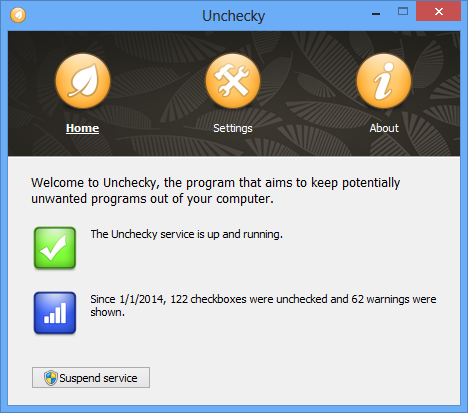
Tired of unchecking unrelated offers while installing software?
Have you ever felt, while installing software, that the installer
tries to push additional unwanted programs at all cost? Ever missed a
checkbox, and spent hours afterwards removing adware? Ever opened your
browser after an installation, only to find out that you have a new
homepage, a new search engine, or even a new browser? Unchecky aims to
keep potentially unwanted programs out of your computer.
Unchecky’s primary feature is automatic unchecking of unrelated offers,
such as potentially unwanted programs, offers to change your homepage
or your search engine. With Unchecky, these offers become opt-in instead
of opt-out, i.e. they will be installed only if you explicitly choose
you want them (you usually don’t).
Another important feature of Unchecky is that it warns when you accept a potentially unwanted offer.
Installers often provide them as a natural part of the installation, so
they can easily be accepted by mistake. With Unchecky, it’s less likely
to accidentally accept such offers.
Unchecky is not an universal solution, and might not support
installers which were not released yet. Thus, it’s worth noting that
Unchecky updates automatically, so you don’t have to worry about running the latest version.
What's new in this version:
- Hotfix: fixed Croatian translation encoding.
v0.2.12 (April 26, 2014)
- Support for SweetIM Bundle.
- Improved support for Softonic installer.
- Added help for command line arguments of the installer. Run "unchecky_setup.exe -?" to see it.
- Various filter updates.
- Croatian translation, by Marko.
Download: Unchecky 0.2.13 | 679 KB (Freeware)
View: Unchecky Website
Find torrent files and download them to your PC in two steps with
Free Torrent Download! This handy application is made to be fast, free
and furious in order to save your time and efforts.
Free Torrent Download is an easy-to-use, powerful and yet free
program that includes all the functions a torrent downloader will ever
need.
Here are just some of them:
- specially designed for fast and easy downloads
- no speed or size limit
- suitable for beginners as it has a guide that simplifies its usage
- simple management of torrent downloads
- configuration settings to please an advanced user
- fast downloading and super-efficient installation due to its small size
- simple and user-friendly interface, etc.
Moreover, a big variety of options allows you to set the configuration to your liking. You may do the following:
- start torrent downloader when system starts
- choose the location of downloaded files
- use other ports and networks when the main server is unavailable
- configure proxy setting
- set queue and download limits
Note: Free Torrent Download includes 3rd party
(optional) software, you should pay close attention to avoid installing
unwanted products.
Download: Free Torrent Download 0.0.16.424 | 22.3 MB (Freeware)
View: Free Torrent Download Website
Spybot - Search & Destroy is an anti-malware application designed
for on-access and on-demand scanning and removal of various kinds of
malware, including spyware, adware, hijackers and trojan horses. Spyware
silently tracks your surfing behaviour to create a marketing profile
for you that is transmitted without your knowledge to the compilers and
sold to advertising companies.
Spybot not only provides detection and removal of adware and spyware
but also antivirus protection. Spybot v2.3 includes a Professional
Edition license valid for 30 days, so you can try and test all the
features of the program.
What's new in this version:
- New enhanced detection methods. This means better protection against the new wave of spyware, rootkits and viruses.
- Scanning and cleaning is now much faster. Tweaked the scanning
engine so it now scans faster and some cleaning tasks are now fully
automated.
- Improved Startup Tools. These powerful tools now work with even the latest Windows Operating Systems.
- SDScan now runs automatically with escalated privileges. This means no more annoying restarts and no need to run SDCleaner.
- New ‘Notifications’ feature: Spybot can now be configured to send
the results of scans on your PC to your mobile device, server, chat or
website. You no longer have to wait around while Spybot is doing a scan.
As soon as your scan finishes a message will be sent to your chosen
device and you will be informed of possible threats. This means you can
react and make decisions on what action to take much faster.
Download: Spybot - Search & Destroy 2.3.39 | 44.2 MB (Freeware)
View: Spybot Search & Destroy Website | Release Notes
Bandizip is Lightweight, Fast, and Free archiving software and it
works with WinZip, 7-Zip, WinRAR and other archive formats. It handles
the most popular compression formats, including Zip, 7z, and Rar files
for free! Bandizip supports for ZIP, 7Z, RAR, ALZ, EGG, TAR, BH, LZH,
GZ, BZ2, ISO, CAB, WIM, XZ, ARJ, and Z archives files and users can
create self-extracting files (.EXE) and multi-volume (split) archives
files. Bandizip is 100% free Archiver for home and office.
Bandizip has a very fast Zip algorithm for compression &
extraction by Fast Drag and Drop, High Speed Archiving, and Multi-core
compression function.
Bandizip supports the following features:
- Packing and Unpacking: Zip(z01), ZipX(zx01), TAR, TGZ, 7Z(7z.001), and EXE(e01)
- Unpacking Only: RAR(part1.rar, r01), ACE, ALZ, APK, ARJ, BH, BZ,
BZ2, CAB, EGG, GZ, J2J, JAR, IMG, IPA, ISO, LHA, LZH, LZMA, PMA, TBZ,
TBZ2, TGZ, TLZ, TXZ, UDF, WAR, WIM, XZ, Z
- Support unicode to display international characters which display for filenames in archives
- Bypass the bad compression files automatically by "High Speed Archiving" function
- Extract the files to the destination folder directly by "Fast Drag & Drop" function
- Create self-extracting file (.EXE) and multi-volume (split) archives
- Optional archive encryption using ZipCrypto and AES 256
- Context Menu access including "Preview Archive" function
- Create or extract multiple zip files simultaneously from windows explorer
- Free to use at both home and in the office
- Operating system: Windows 2003, XP, Vista, 7, 8 (Support for 32-bit and 64-bit)
Download: Bandizip 3.11 Build 10753 | 4.1 MB (Freeware)
Download: Portable Bandizip 3.11 Build 10753 | 2.3 MB
View: Bandizip Home Page
Adobe Flash Player is the high performance, lightweight, highly
expressive client runtime that delivers powerful and consistent user
experiences across major operating systems, browsers, mobile phones and
devices.
Installed on over 750 million Internet-connected desktops and mobile
devices, Flash Player enables organizations and individuals to build and
deliver great digital experiences to their end users.
- Immersive experiences with Flash video, content and applications with full-screen mode.
- Low-bandwidth, high-quality video with advanced compression technology.
- High-fidelity text using the advanced text rendering engine.
- Real-time dynamic effects with filters for Blur, DropShadow, Glow,
Bevel, Gradient Glow, Gradient Bevel, Displacement Map, Convolution, and
Color Matrix.
- Innovative media compositions with 8-bit video alpha channels.
- Blend modes, radial gradient, and stroke enhancements.
- Additional image formats: GIF, Progressive JPEG, and PNG.
Mozilla Firefox is a fast, full-featured Web browser. Firefox
includes pop-up blocking, tab-browsing, integrated Google search,
simplified privacy controls, a streamlined browser window that shows you
more of the page than any other browser and a number of additional
features that work with you to help you get the most out of your time
online.
The Web is all about innovation, and Firefox sets the pace with
dozens of new features to deliver a faster, more secure and customizable
Web browsing experience for all.
User Experience. The enhancements to Firefox provide the best
possible browsing experience on the Web. The new Firefox smart location
bar, affectionately known as the "Awesome Bar," learns as people use it,
adapting to user preferences and offering better fitting matches over
time.
Performance. Firefox is built on top of the powerful new Gecko platform, resulting in a safer, easier to use and more personal product.
Security. Firefox raises the bar for security. The new malware
and phishing protection helps protect from viruses, worms, trojans and
spyware to keep people safe on the Web.
Customization. Everyone uses the Web differently, and Firefox lets users customize their browser with more than 5,000 add-ons.
Download: Firefox 29.0 for Windows | 27.7 MB (Freeware)
Download: Classic Theme Restorer (Customize Australis)
Download: Firefox 29.0 for Linux | 34.6 MB
Download: Firefox 29.0 for MacOS | 56.1 MB
View: Firefox Website | Release Notes (Not yet available)